CloudDNS
Manage DNS records without web hosting or instantly connect the domain to Shopify, Wix, or Google!
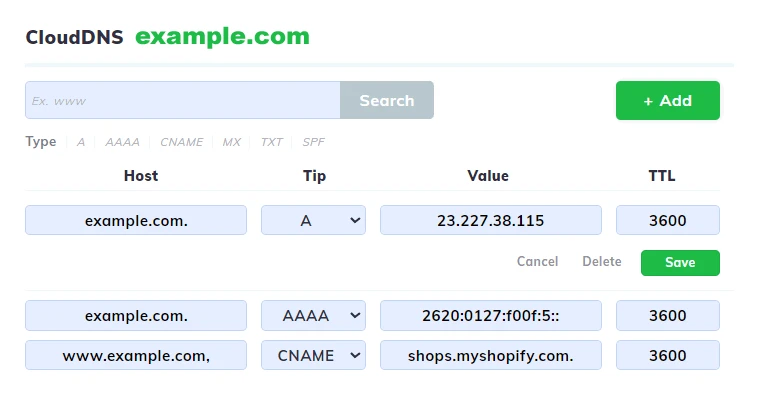
With CloudDNS, you no longer need web hosting to use the domain. In just a few clicks, you can create or edit DNS records and quickly connect it to Shopify, Wix, Google Workspace, or any other external service. Fast, intuitive, for only €5.99 per year.
Cloud TemplatesDNS
Connect your domain instantly with predefined CloudDNS templates.
dns.Shopify
NouWith the Shopify template, you can connect your domain to your online store in no time. The DNS configuration is applied automatically, so Shopify immediately recognizes the domain as the primary address of the store. You no longer waste time with complicated settings, your customers go directly to the site, and you can focus on sales. It is the perfect solution for entrepreneurs who want a quick and hassle-free integration.
dns.Google
NouThe Google Workspace template automatically adds all the necessary DNS records for setting up professional emails with your domain. MX, TXT, and SPF are correctly set from the start, ensuring messages are delivered to the Inbox and pass security checks. There's no longer a risk of configuration errors; in just a few minutes you have functional custom email addresses, with all the power of Google services.
dns.Wix
NouThe Wix template automatically configures all the necessary DNS records so that your domain is correctly associated with the Wix platform. You no longer need to manually enter A or CNAME values, nor do you have to search through documentation for what needs to be filled out. In a matter of seconds, the domain is recognized by Wix and your site becomes accessible without errors or interruptions. Ideal for users who want a simple and secure process.
Why choose CloudDNS from Hostico
With Hostico's CloudDNS you have speed, security, and automated configurations for the most popular online services.
A modern, fast, and uncompromising solution.
Control
You control the domain without needing web hosting. All DNS records are managed centrally, directly from your Hostico account, without complicated interfaces or additional services. You have the freedom to configure the domain exactly as you want, anytime, from anywhere.
Login
You can associate the domain with external services such as Shopify, Wix, or Google Workspace in just a few clicks. The pre-established templates eliminate any technical headaches, and the correct settings are applied instantly. Your domain becomes visible and functional without lost time or manual configurations.
Flexibility
You have the freedom to add, edit, or delete DNS records at any time, adapting your domain to current needs. From simple A or CNAME modifications to complex configurations with MX and SPF for professional emails – everything is done quickly and intuitively, without complications.
FAQ
Frequently Asked Questions
The FAQ section is designed to quickly answer the most common questions related to our services. Explore the frequently asked questions and discover how we can simplify your experience!