Tutorials • ISPConfig
Adding a TXT record in the ISPconfig control panel.
In this tutorial, we will present the steps necessary for adding a TXT type DNS record in the ISPConfig control panel.
Views 2577Updated 2 aniPublished on 22/11/2022by Florin P.
Introduction
- TXT records are a type of DNS record that contains text information used for various purposes, such as domain verifications, email server records, etc.;
- The ISPConfig control panel allows you to set these records through the DNS menu.
Requirements
- The management data of the ISPConfig panel received in the email inbox associated with the Hostico account when the VPS was activated;
- A TXT record that we will add. We will use as an example a TXT record for domain verification for Google: google-site-verification=rXOxyZounnZasA8Z7oaD3c14JdjS9aKSWvsR1EbUSIQ
Steps
- First, we will connect to the ISPConfig control panel using one of the access addresses: https://SERVERNAME:10200 or https://SERVER_IP:10200 or https://DOMAIN.XX:10200

After logging in, on the next page we will click the DNS button.

To view the DNS zone we are making changes to, click on the associated domain name.

Next, we will click on the green TXT button to add the DNS record.

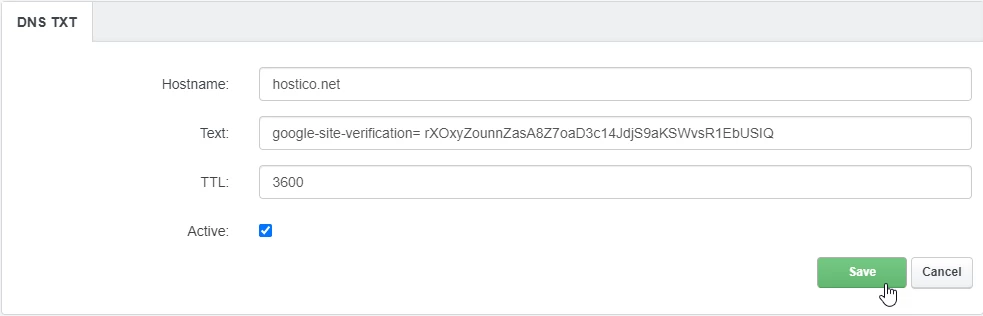
The fields on the next page will be modified as follows:
- Hostname: We will leave the domain name for which we are making changes;
- Text: TXT record, for example: google-site-verification=rXOxyZounnZasA8Z7oaD3c14JdjS9aKSWvsR1EbUSIQ;
- TTL: It will be set to 3600;
- Active: It will remain checked, for the registration to be active.
To save, we will click the Save button at the bottom of the page.
- Propagating these records may take a few hours. We recommend clearing your browser cache and/or the operating system's DNS cache before checking;
- DNS propagation is the time interval required for DNS changes to be updated on the internet.