Tutorials • Email
Adding an email forwarder in the Plesk panel
In the menu dedicated to emails, the Plesk panel allows setting up forwarding for the created email boxes. This tutorial describes the steps necessary to configure a forwarding.
Views 1106Updated 1 anPublished on 16/07/2021by Alexandru J.
Introduction
- The Plesk panel allows setting up a forwarding of incoming emails to a certain mailbox. Once a forwarding is set up, a copy of the received email will also be sent to another mailbox specified by the user.
Requirements
- a Plesk account
- an email address on that Plesk account
Steps
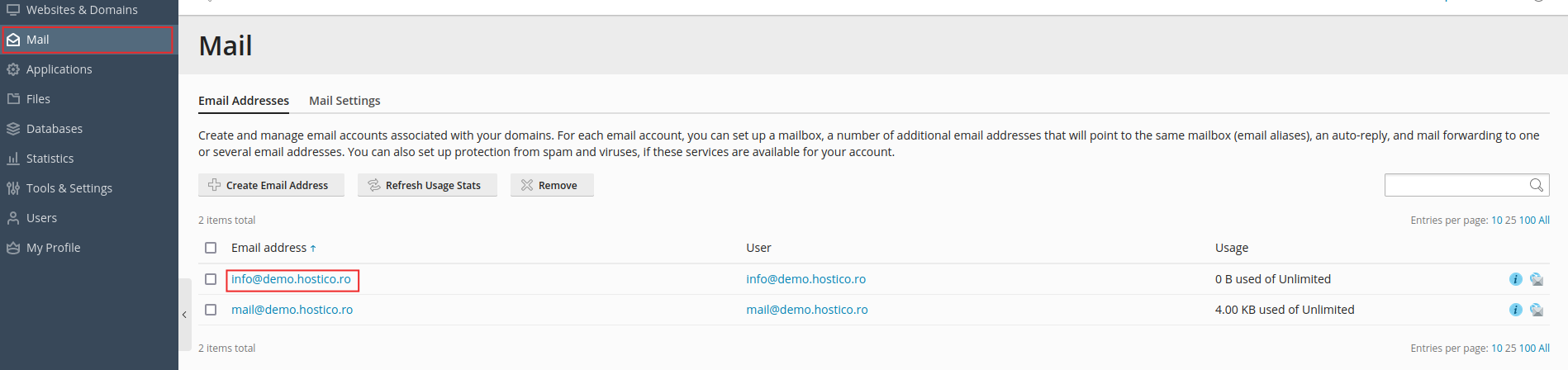
- After logging in to the panel, we will go to the Mail section and click on the email address to which we want to add a redirect.
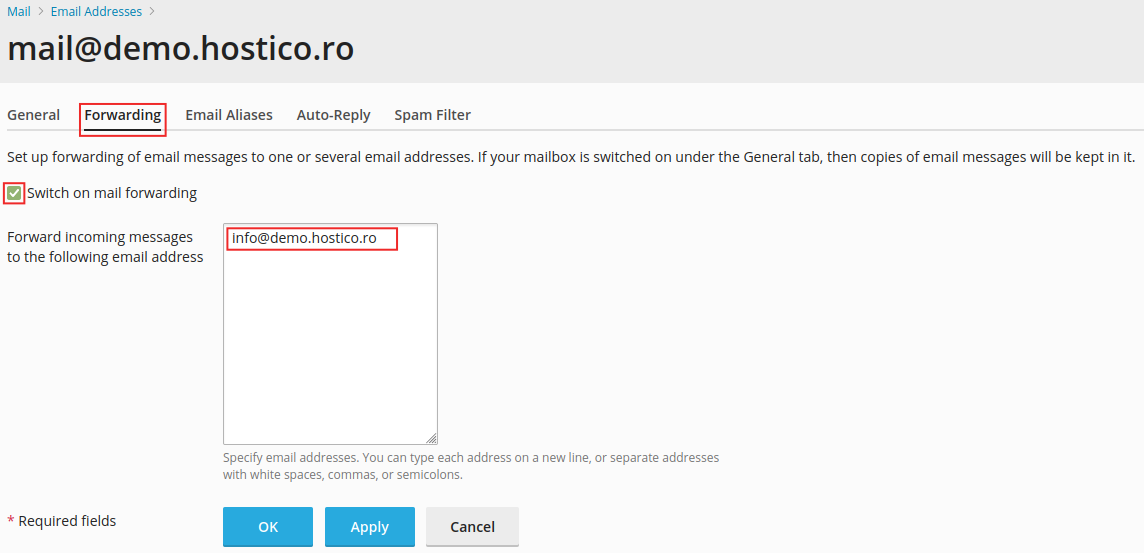
- In the next window, we will choose Forwarding, where we need to check Switch on mail forwarding to add, in the box on the right, one or more addresses to which we want to forward the received emails, after which we will click Ok.
- If everything is in order, the panel will return us to the Mail window, where, to the right of the email address, the address to which we have set that redirect will appear.

- To delete that Forwarder, we only need to remove the address from the same place where we added it.