🌼 Spring Sale — Up to 60% discount for hosting and domains
TutorialsCommercial

Changing the email address associated with the Hostico client account.

In this tutorial, the procedure applied for changing the email address in the Hostico client account is exemplified.

2
Views 1851Updated 5 luniPublished on 18/07/2018by Mark Dohi

Introduction

 This tutorial will illustrate the steps applied to change the email address in the Hostico customer account;

Requirements

Steps

  • After logging into the Hostico customer account, click the USER button on the left side of the page;
  • The open page will display all personal data belonging to the rights holder;
  • In the Client Profile section, go to the Change email address;
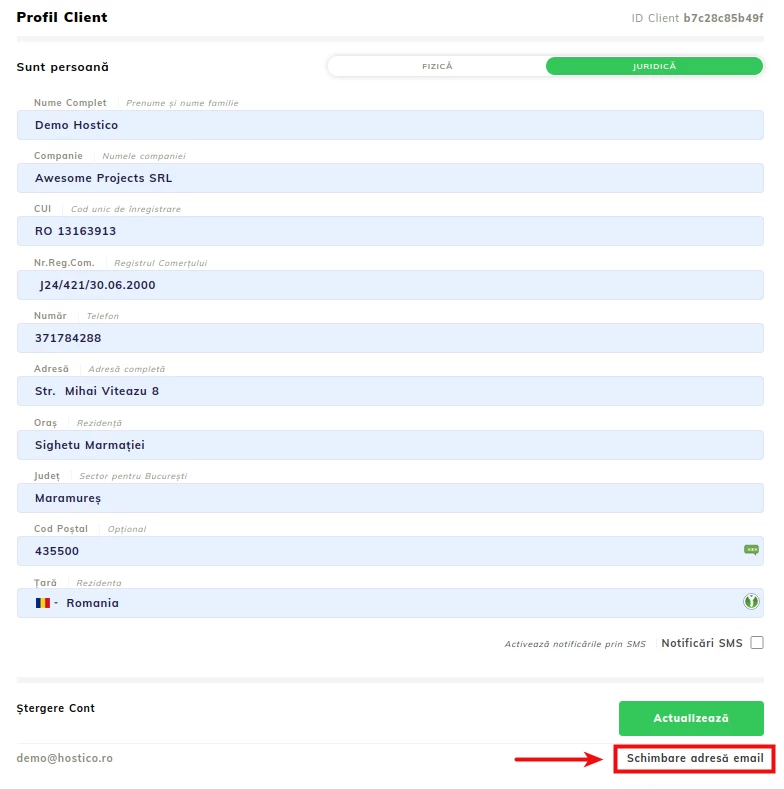
In the newly opened window, you will need to insert the new email address that you want in the client account;

The action will be registered after the client attaches a copy of the identity document (individual)/ copy of the company's certificate from the account (legal entity);
IMPORTANT! - The photo of the identity document must be in the form of a selfie, so that the holder's details can be validated.
For security reasons, this procedure is essential for verifying the account holder of Hostico;
After completing the necessary steps, the last opened box will confirm the submission of your request to change the email address.

Note

After completing the above steps, an automatic ticket will be opened with the request to change the email address;
The change will be processed by the operators of the commercial department, following the review of the attached document;

Similar Articles

Creating an email account in cPanelTutorials /cPanel

The cPanel allows for the creation of an unlimited number of email accounts associated with hosted domains. This tutorial will explain the necessary steps to create and access an email account.

27
by Cătălin Adrian
Views 5035
Updated 1 year ago
Published on 28/06/2017
Adding a secondary contact (Subcontact)Tutorials /Commercial

Add a secondary contact in your Hostico client account by following these simple steps. Make sure you have an existing account and activate the necessary rights.

27
by Mark Dohi
Views 2452
Updated 1 year ago
Published on 08/07/2017
Cancellation of hosting services.Tutorials /Commercial

In this tutorial, we illustrate the process of canceling a hosting service from the Hostico client account.

20
by Mark Dohi
Views 1162
Updated 1 year ago
Published on 04/06/2018
Modification of the proforma invoiceTutorials /Commercial

In this tutorial, the actions necessary for modifying the data of an unpaid pro forma invoice are presented.

12
by Mark Dohi
Views 5435
Updated 2 years ago
Published on 29/05/2019
Authentication in cPanel from the client account.Tutorials /Commercial

This tutorial will illustrate the procedure that can be used to log into the cPanel of a hosting service from the Hostico client account.

9
by Mark Dohi
Views 5383
Updated 1 year ago
Published on 05/06/2018