🌼 Spring Sale — Up to 60% discount for hosting and domains
TutorialsPlesk

Deleting a subscription in the Plesk administration panel

In this article, we will present the necessary steps to delete a site/subscription in the Plesk administration panel.

Views 464Updated 11 luniPublished on 07/02/2020by Alexandru Jurca

Introduction

  • If we no longer wish to host a site and/or want to free up disk space, we will log in to the panel and follow the steps described below.
  • This action will involve the deletion of all data associated with the deleted account.

Requirements

  • Access to the Plesk administration panel, username, and password.

Steps

  • First, we will log in to the administration panel.
  • Deleting all data belonging to a site/subscription in the Plesk panel can be done from the configuration menu associated with it.
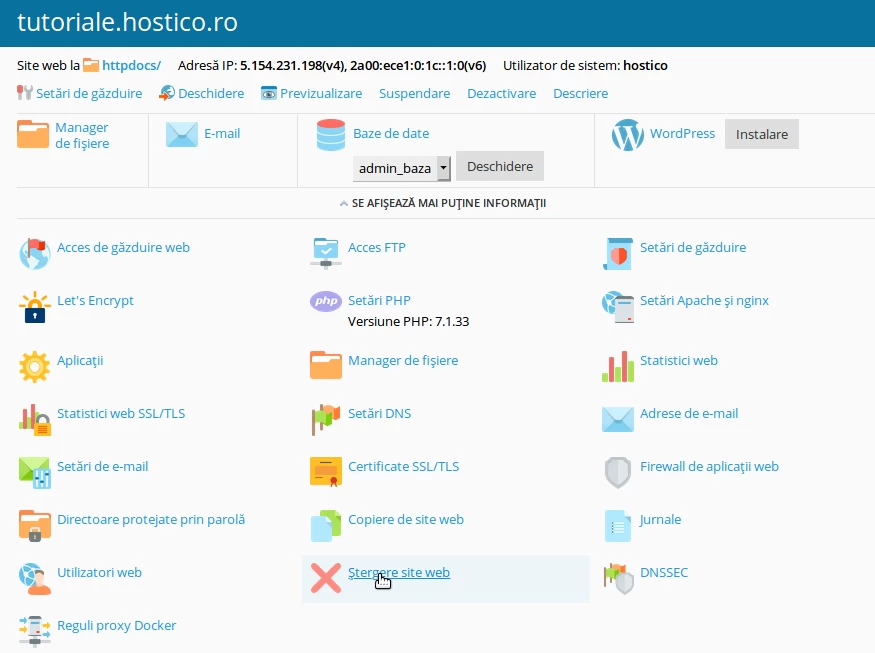
Stergere Site Selectie

  • After selecting the option, a confirmation window for the action will be displayed on the screen.
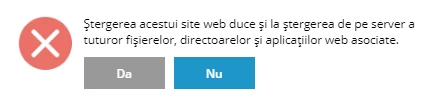
Confirmare Stergere

  • Attention, this procedure will delete all information related to the site: email accounts, files, and the database, as well as its registration in the Plesk control panel.

Similar Articles

Delete Client AccountTutorials /Commercial

Learn how to permanently delete your Hostico client account in simple steps. The deletion confirmation will remove all personal data, with no possibility of recovery.

1
by Mark Dohi
Views 1171
Updated 4 months ago
Published on 10/08/2020
Creating individual management panels for Plesk resellingTutorials /Plesk

This article explains how to create and provide access to specific subscriptions in the Plesk administration panel.

by Cătălin Adrian
Views 739
Updated 11 months ago
Published on 23/08/2019
Web Statistics PleskTutorials /Plesk

Learn how to view statistics about your website's traffic through Plesk, including data about storage space and visitors, for an effective evaluation.

by Alexandru Jurca
Views 731
Updated 11 months ago
Published on 16/07/2021
Activating SSI support in the Plesk administration panelTutorials /Plesk

In this article, we will present the steps necessary to enable SSI support in the Plesk administration panel.

by Alexandru Jurca
Views 474
Updated 11 months ago
Published on 07/02/2020
Deleting an SQL user in the Webuzo panelTutorials /Webuzo

Learn how to delete an SQL user in the Webuzo administration panel, step by step, to effectively manage the database.

by Cătălin Adrian
Views 444
Updated 11 months ago
Published on 08/08/2018