Tutorials • WHM
Bandwidth usage limitation
This article explains how to limit the bandwidth provided to a cPanel account in the WHM panel.
1
Views 1369Updated 2 aniPublished on 31/05/2018by Cătălin A.
Introduction
This tutorial explains how to limit bandwidth for cPanel accounts hosted on a reseller.
Requirements
- a WHM account
Steps to Follow
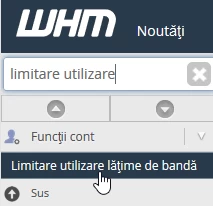
- after logging in to the WHM control panel, in the interface that will be displayed, we search in the upper left window for "Bandwidth Usage Limit"
- after selecting the result, in the window that will appear, the domain can be searched in the search bar or selected from the displayed list
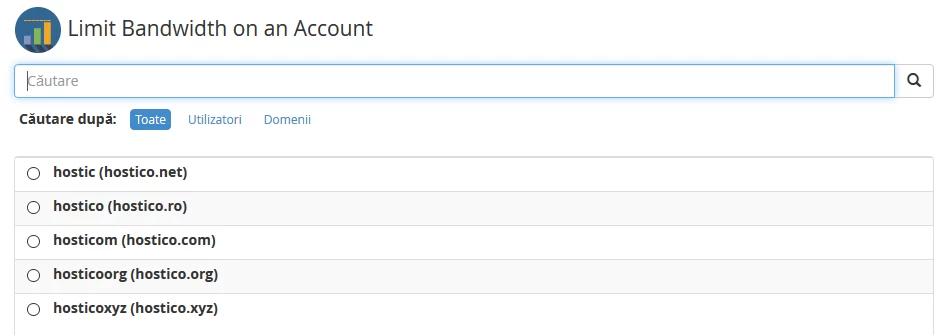
- the desired account is selected and then the "Limit" button is pressed

- In the next window, a table will be displayed containing: User, Bandwidth used, Bandwidth limit
- for Bandwidth limit there are two options:
- Unlimited
- The maximum number of MB that can be used as traffic for that site is set in the box
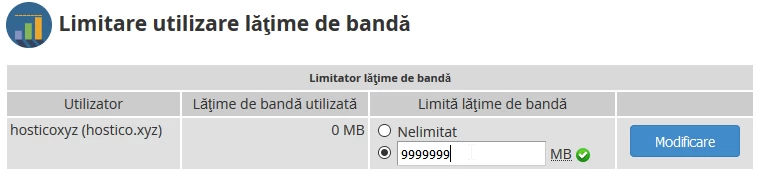
- after setting the desired limit, press the "Modify" button on the right side of the table

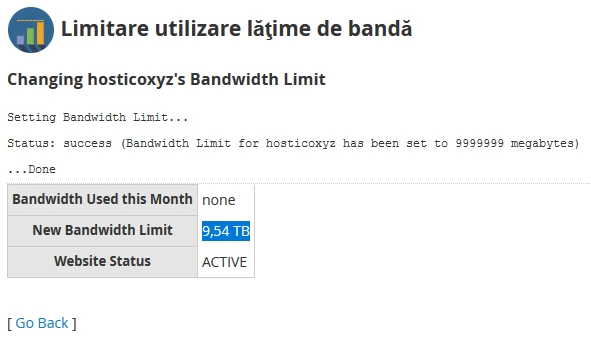
- in the next window, you will receive confirmation of the change and the set bandwidth will be displayed
Note:
- The limit is for a duration of one month. If the site generates traffic exceeding this limit, the site will be automatically suspended by WHM
- At the beginning of each month, the site traffic is reset to 0.