🌼 Spring Sale — Up to 60% discount for hosting and domains
TutorialsDev

Verification of applications installed through the Softaculous plugin under reseller

This article describes the steps necessary to verify applications installed by customers under a reseller, using the Softaculous plugin in WHM.

Views 489Updated 1 anPublished on 16/07/2021by Eduard Konievic

Introduction

  • In this tutorial we will present the necessary steps for verifying the applications installed by clients using the cPanel Softaculous plugin.
  • Softaculous is an auto-installer that simplifies the installation of web applications. It includes numerous CMSs (Content Management Systems), such as: WordPress, Joomla, PrestaShop, phpBB, Magento, WHMCS, etc.

Requirements

  • The authentication details for the WHM panel, present in the email with reseller administrative details.

Steps

  • We log in to WHM with the relevant account details.
  • We can use DOMAIN/WHM or IP/WHM

cpanel whm login


  • In part left we will look for Softaculous - Instant Installs
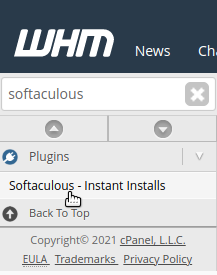
hostico softaculous Whm


  • In the following window we have the page for settings and statistics for the accounts created under reseller.
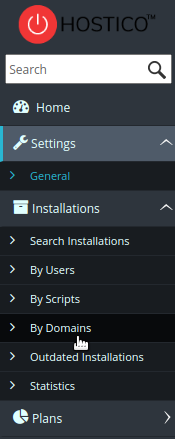
Softaculous whm settings

  • For example, from the By Domains submenu we can verify the CMSs and the versions installed on reseller accounts filtered by the domain name.
  • Outadet Installations indicates instances that have updates available
  • By User filters the results by cPanel user.
  • By Scripts filters the results by the type of CMS installed.

hostico whm softaculous


Similar Articles

DNS settings in the Webuzo panelTutorials /Webuzo

Learn how to edit and set DNS records in the Webuzo panel. Follow the steps to effectively manage domains and subdomains.

48
by Alexandru Rogojan
Views 2316
Updated 11 months ago
Published on 14/09/2017
Changing the PHP version in cPanel on VPS hosting packages via MultiPHP ManagerTutorials /cPanel

In this article, we will present the necessary steps to change the PHP version in a cPanel account using MultiPHP Manager.

46
by Sebastian Szlivka
Views 2539
Updated 1 year ago
Published on 18/10/2017
Clear cache and history in Chrome browserTutorials /Apps

Learn how to delete your history and cache in Google Chrome using the Ctrl+Shift+Delete key combination. The tutorial includes simple steps and applicability in other browsers.

36
by Florin Petran
Views 6278
Updated 5 years ago
Published on 08/01/2018
Creating an email account in cPanelTutorials /cPanel

The cPanel allows for the creation of an unlimited number of email accounts associated with hosted domains. This tutorial will explain the necessary steps to create and access an email account.

27
by Cătălin Adrian
Views 5039
Updated 1 year ago
Published on 28/06/2017
SSH settings in WebuzoTutorials /Webuzo

In this tutorial, learn how to block SSH access on the Webuzo server by enabling the connection and configuring the necessary port.

20
by Alexandru Rogojan
Views 1064
Updated 11 months ago
Published on 12/06/2018