🌞 Summer Sale — Up to 70% discount for hosting and domains
activate now
TutorialsCommercial

Domain expiration check.

Find out how to check the expiration date of your domain in your Hostico account and important information about renewal.

Views 604Updated 2 aniPublished on 26/01/2019by Mark D.

Introduction

In this tutorial, we will show you how to find out the date when your domain expires;

Requirements

Steps

  • After logging into the client account, go to the Domains;
    section
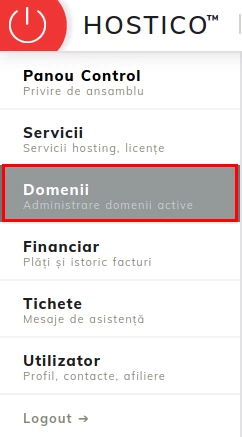
  • There you will be able to view the domains you own as well as information about them, such as: registration date, expiration date, domain status;
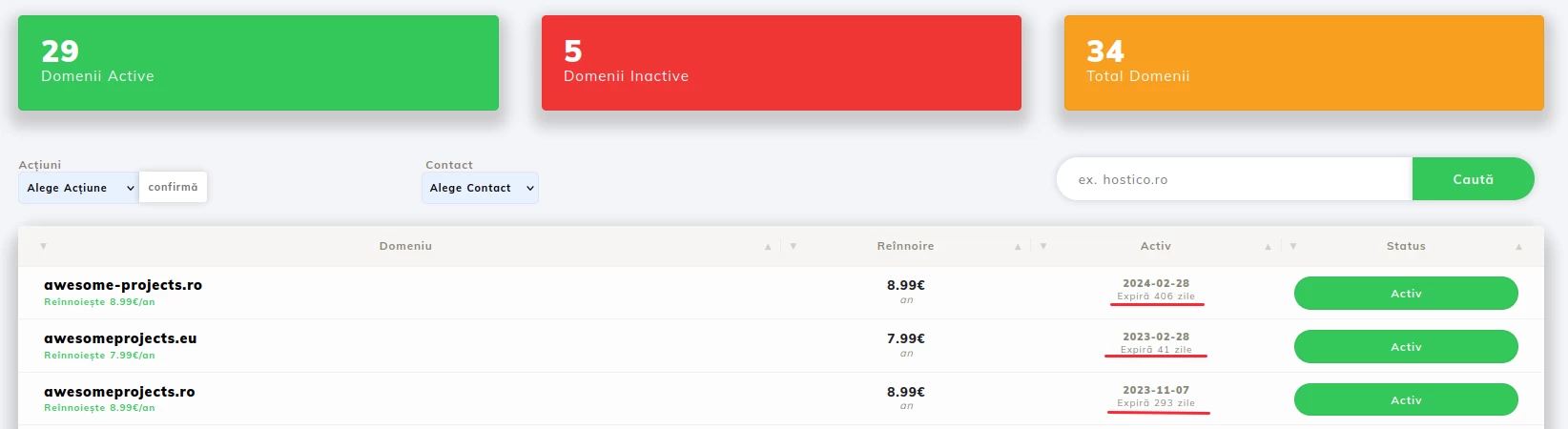
Note

  • The domain renewal invoice is issued automatically 14 days before the due date;
  • If you want to pay for the domain renewal before the invoice is issued, please contact the sales department;

Similar Articles

Creating an email account in cPanelTutorials /cPanel

The cPanel allows for the creation of an unlimited number of email accounts associated with hosted domains. This tutorial will explain the necessary steps to create and access an email account.

29
by Cătălin A.
Views 5626
Updated 2 years ago
Published on 28/06/2017
Adding a secondary contact (Subcontact)Tutorials /Commercial

Add a secondary contact in your Hostico client account by following these simple steps. Make sure you have an existing account and activate the necessary rights.

27
by Mark D.
Views 2917
Updated 2 years ago
Published on 08/07/2017
Cancellation of hosting services.Tutorials /Commercial

In this tutorial, we illustrate the process of canceling a hosting service from the Hostico client account.

23
by Mark D.
Views 2090
Updated 2 years ago
Published on 04/06/2018
Modification of the proforma invoiceTutorials /Commercial

In this tutorial, the actions necessary for modifying the data of an unpaid pro forma invoice are presented.

15
by Mark D.
Views 6301
Updated 3 years ago
Published on 29/05/2019
Authentication in cPanel from the client account.Tutorials /Commercial

This tutorial will illustrate the procedure that can be used to log into the cPanel of a hosting service from the Hostico client account.

12
by Mark D.
Views 6120
Updated 1 year ago
Published on 05/06/2018