Tutorials • Email
Importing email addresses in cPanel
This article explains how to import a list of email addresses or a list of redirections.
Views 947Updated 2 aniPublished on 30/01/2018by Cătălin A.
Introduction
This tutorial explains how to import a list of email addresses or forwarders into your cPanel account.
Requirements
- a cPanel account
Steps to Follow
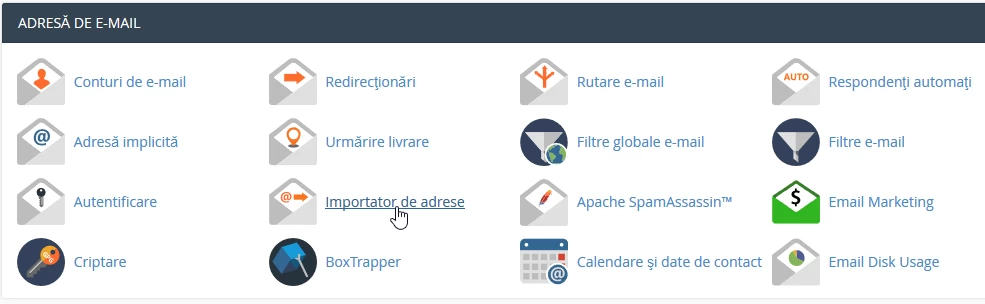
- after logging in to the cPanel control panel, in the interface that will be displayed, we look for the section "EMAIL ADDRESS", and there we click on "Address Importer"
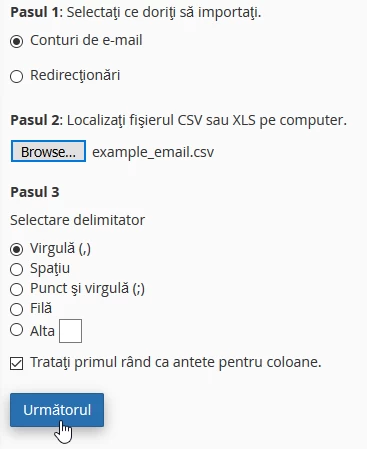
- In the next window, check what we want to import, in this case a list of email addresses, then click on "Browse" to select the file from your computer that will be imported and then click on the "Next" button.
- In the next displayed page, depending on the content of the columns in the CSV file, the header will be synchronized to match the content of the columns.

- at step 2, select the domain for which the import is made, in case there are multiple domains hosted on this account, it should correspond to the domain of the email addresses and click on the "Next" button followed by "Finish"

If you wish to create a CSV file, you can refer to examples by clicking the "examples page" button.

To import a list of redirects, the procedure is the same, except that in step 1, "Redirects" is checked.